

This release delivers a major expansion of multi-day product capabilities, transferrable coupons, concierge enhancements, and targeted improvements across the SnowCloud platform.
SnowCloud Shop
The shop receives expanded multi-day purchasing flows, a redesigned checkout experience, business bundle support, and new promotional tools.
New Features
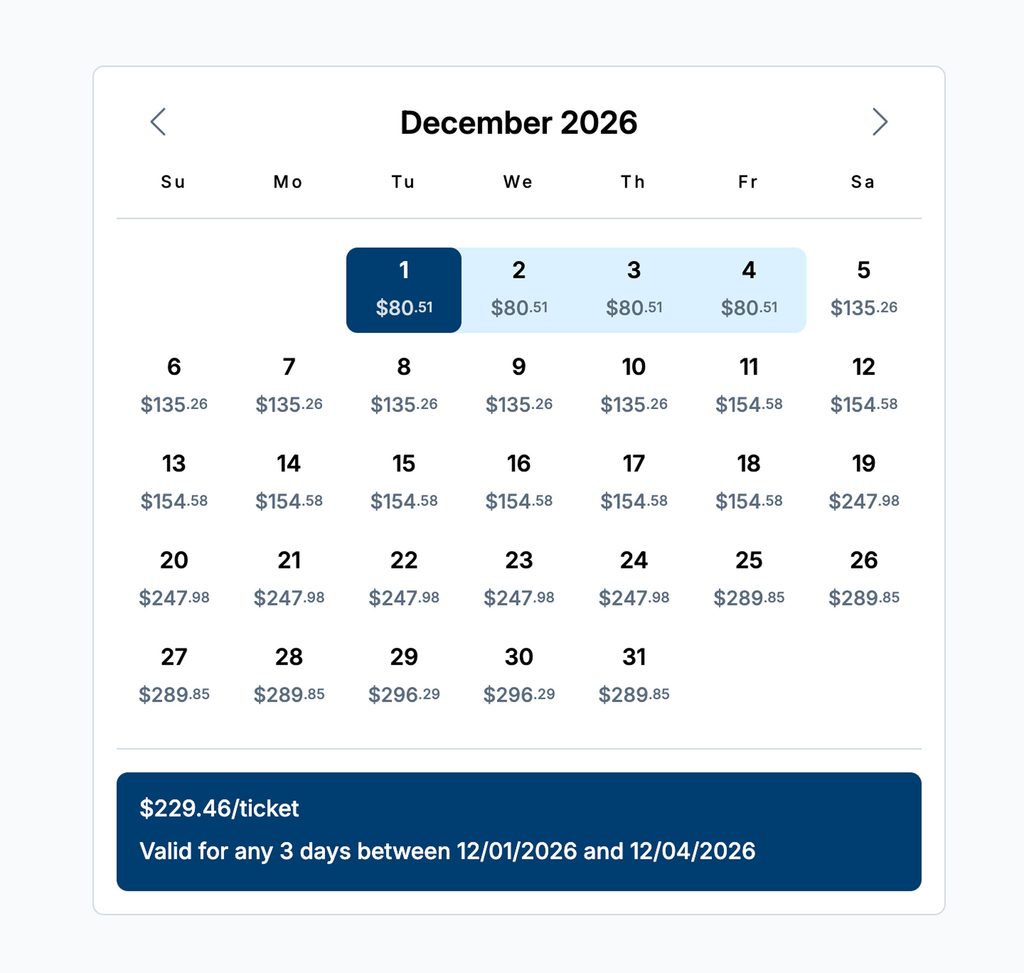
- Multi-Day Pricing: Guests can now purchase multi-day lift tickets, rentals, and lessons with pricing calculated from each individual day’s rate, then reduced by a configured multi-day discount.
- A “Number of Days” selector replaces the previous tier grid, and the Item Summary displays the bundle price, rack rate comparison, validity window, and applied discount percentage.
- Advance Purchase Pricing tiers now also apply to single-day purchases when configured, stacking with multi-day discounts for additional savings.
- Skip Days: Multi-day products offer skip day rules where a product is valid across a broader date range than the purchased usage days. For example, a 5-day ticket can allow usage on any 5 days within a 7-day validity window.
- Entitlement Validation: Access control validates scans against multi-day entitlement rules, tracking used days, remaining days, and validity window expiration.
- Multi-Day Product Add-Ons: Product add-ons now support multi-day configurations, allowing cross-sells and upsells to match the multi-day purchase window.
- Advance Purchase Pricing Tiers: Single-day purchases now support advance purchase pricing tiers when configured, stacking with multi-day discounts for additional savings.
- Transferrable Coupons: Guests can now transfer coupons to friends via email. The original owner retains visibility of the coupon status (Transferred, Cancel Transfer, and Claimed) and can recall an unused coupon. Recipients claim the coupon from a link and apply it at checkout.
- Multi-Line Item Cart Discounts: Coupons can now be configured to discount all eligible line items in the cart simultaneously, rather than applying to only one item. Administrators enable this via a “Whole Cart” option in coupon rule configuration.
- Reservation Calendar Redesign: The product reservation calendar has been rebuilt with an updated UX that supports multi-day date range selection, clearer availability display, and streamlined date picking.
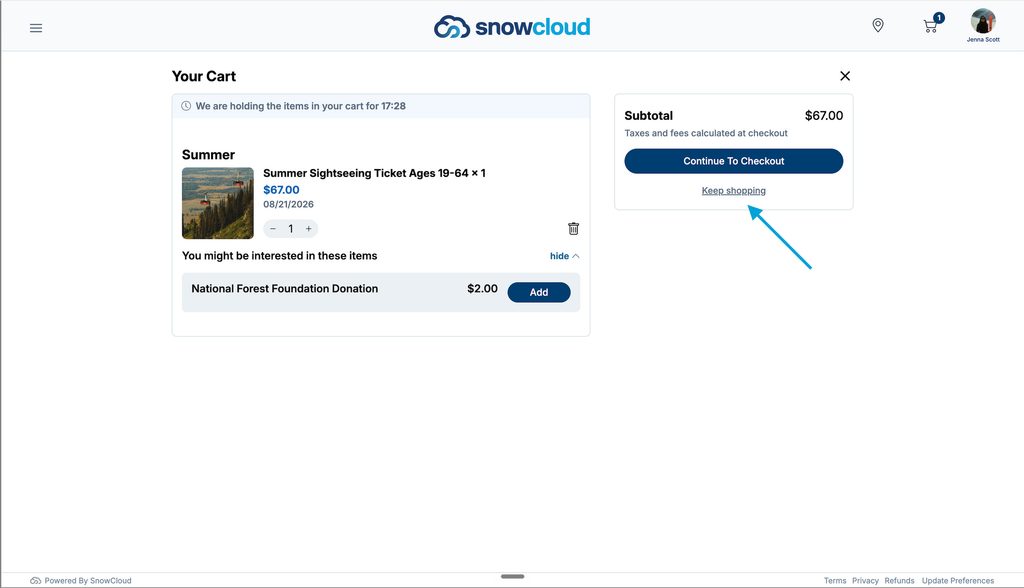
- Keep Shopping Link: A “Keep Shopping” link now appears below the checkout button on the cart page, providing a clear path back to continue browsing.
- Checkout Page Redesign: The checkout page layout has been updated with improved organization of payment methods, gift cards, coupons, tips, and order editing. The redesign supports desktop and mobile screens.
Improvements
- Promotional Rate Display: Cart line items now display the promotional price with rack rate strikethrough when promotional pricing is active.
- Payment Completion Stability: Improved the payment processing flow so that completed payments quickly redirect to the sale receipt. Failed payments now return informational messages with the ability to retry under a different payment method.
- Business Bundle Confirmation Routing: The “Assign Products” button on business bundle sale confirmations and order history details now routes to the group management page.
SnowCloud Portal
The admin portal gains self-service image management, GL Journal updates, and inventory pool improvements.
New Features
- Custom Image Upload: Administrators can now upload custom login background images and resort logo images directly from Setup > Site Settings in the portal. Uploaded images appear on the guest-facing shop login page and throughout the branded experience.
- Retail Commission Configuration: Administrators can define commission rules for retail shops, including percentage rate, optional item class filtering, and active date ranges. A Commission Report summarizes earned commission by associate and date range, matching sales data against the configured rules.
- Retail Sale Staff Reassignment: Managers can reassign the staff member on a completed retail sale from the Services view. The system records the original staff, new staff, who made the change, and when. Commission calculations update automatically to reflect the reassignment, and a full audit history is available.
Improvements
- Location Hierarchy Display: Removed connecting lines appearing in the location hierarchy tree view after editing location containers.
- Inventory Pool Management: Products removed from an inventory pool template can now be re-added. Inventory pool records can now be deleted from the Inventory Calendar.
- Access Product Configuration: Removed an occasional error popup that appeared when saving changes to access products.
- Guest Selection Options UI: Guest Selection Options settings have been reorganized into a dedicated card within the product setup interface, preparing for expansion to additional product types beyond lessons.
SnowCloud Operator App
The Operator App has several new features and usability enhancements, including S700 device management, house account expansion, and POS stability improvements.
New Features
- Concierge Multi-Day Support: Concierge mode supports all multi-day product capabilities including date range selection, number-of-days configuration, and multi-day pricing for tickets, rentals, and lessons.
- Concierge S700 Card Reader Management: The S700 credit card reader assignment screen now displays whether a unit is in use, which user is currently assigned, and provides the ability to reassign the reader to a different operator.
- Concierge Inventory Impact: Sales completed through Concierge mode deduct from online inventory pools, preventing overselling when operators sell inventory-controlled products at point of sale.
- House Accounts in Concierge Web: House Account payment is now available in the Concierge Web interface, matching the functionality already present in the Operator App.
- House Account Payments: Concierge and Operator App checkouts now support House Account payment for Staff, Folio, and Accounts Receivable account types. When a guest is selected at checkout, any available house accounts appear as a payment option. Group-type accounts are excluded to prevent unauthorized usage.
- POS-Only Activity Shops: Activity shops can now be configured as POS-only, making them visible in Concierge mode without appearing on the guest-facing Store. Operators can sell from these shops directly at point of sale.
- Checkout Quantity Adjustment: Operators can now change item quantity directly on the checkout view for products that do not require guest assignment, reducing the need to navigate back to the cart.
- Cart Item Count on Complete Tab: The Complete tab now displays the number of items in the current cart, giving operators a quick count before finalizing a transaction.
Improvements
- Food & Beverage POS Item Firing: All menu items mapped to a KDS and marked as fireable now fire from the POS, regardless of item type or configuration order.
- Food & Beverage Gratuity Visibility: The Add Gratuity option does not appear on F&B shops that do not have a Tips GL account configured.
- Quick Check-In Entitlements: Ticket entitlements post for quick check-in scanning.
Integrations
- Rentals United: SnowCloud now integrates with Rentals United for lodging channel management, enabling property inventory and rate synchronization with external booking channels like bookings.com, Airbnb and other prominent OTA’S..
