
 AI Document Summary
This document covers the setup workflow for General Ledger (GL) accounts in SnowCloud. GL codes are the foundation of accounting configuration — they are attached to product classifications, taxes, fees, and other financial elements throughout the portal.
UNDERSTANDING GENERAL LEDGER TYPES #
Before creating any new GL codes, it’s important to understand the different types available in SnowCloud. GL types include:
- Accrual Account — tracks revenue and expenses recognized when earned or incurred, regardless of when cash is exchanged
- Cash Account — tracks cash transactions
- Coupon Liability Account — tracks the value of coupons that have been issued but not yet redeemed
- Gift Card Liability Account — tracks the value of gift cards that have been issued but not yet redeemed
- Tax/Fee Account — tracks taxes and fees collected on transactions
- Tips Liability Account — tracks tips that have been collected but not yet distributed
- Voucher Liability Account — tracks the value of vouchers that have been issued but not yet redeemed
CREATING A NEW GENERAL LEDGER CODE #
In addition to the example GL codes provided within SnowCloud, custom codes can be created to track specific transactions.
To create a new GL code:
- From the left-side menu, select Accounting
- Select General Ledger
- Press the plus (+) button in the top-right corner
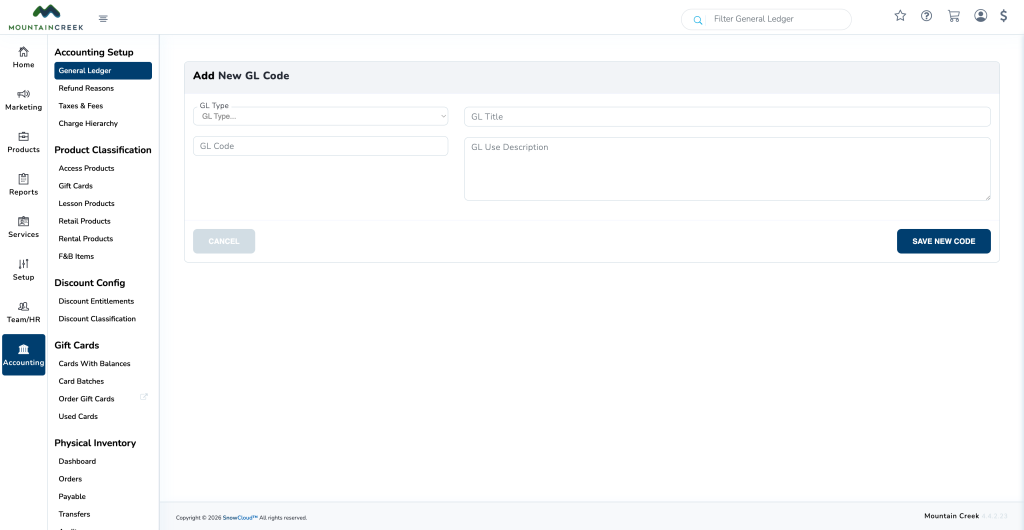
- Fill in the following fields:
- GL Type — select the type of code from the dropdown
- GL Code — enter a unique code for the new account
- Title (optional but recommended)
- Description (optional but recommended)
- Select Save New Code