
 AI Document Summary
This document covers the Overview dashboard in the SnowCloud portal. The Overview is the main landing page after login and provides a real-time snapshot of the operation’s sales activity, access scans, interactions, and weather for the selected date.
Overview Date #
In the top-right corner of the Overview, a date selector allows you to view data for any specific date. Use the calendar input to navigate to a different day, or select the refresh icon to reload the current view.
Summary Metrics #
Across the top of the dashboard, six key metrics are displayed for the selected date:
- Net Sales — total sales revenue after refunds and adjustments
- Revenue — total gross revenue for the day
- Reservations — total number of reservations made
- Visits — total number of guest visits recorded
- Yield — revenue yield for the day
- Interactions — total number of guest interactions logged across all channels
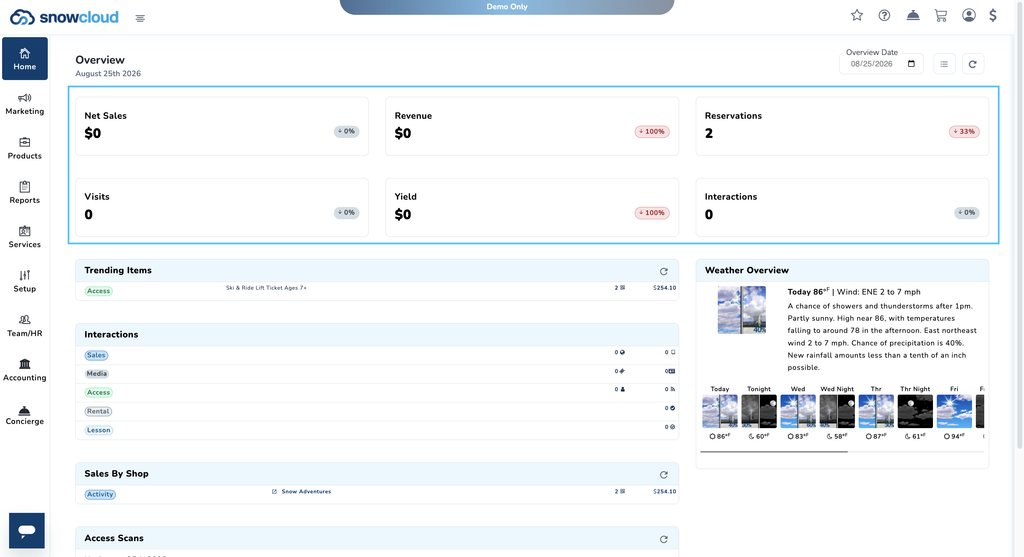
Each metric displays a percentage change indicator showing how the figure compares to the same date in the prior period.
Trending Items #
The Trending Items panel displays the top-selling products for the selected date. Each entry shows the product category tag, product name, quantity sold, and total revenue generated.
Sales by Shop #
The Sales by Shop panel breaks down sales activity by individual shop or activity location. Each entry shows the shop name, number of transactions, and total revenue.
INTERACTIONS #
The Interactions panel shows guest interaction activity broken down by category:
- Sales — purchase interactions
- Media — media-related interactions
- Access — access scan interactions
- Rental — rental interactions
- Lesson — lesson interactions
Access Scans #
The Access Scans panel displays a record of all access scans that occurred at the operation on the selected date.
Other Sales & Refunds #
The Other Sales & Refunds panel surfaces any sales or refund activity that falls outside the standard product categories for the selected date.
Weather Overview #
The Weather Overview panel displays the current weather conditions and a multi-day forecast for the operation’s location. This includes current temperature, wind, and a brief conditions summary, along with a rolling forecast showing daytime and overnight temperatures for the coming days.